Rent, tracked property by property
Most budgeting apps treat rent like any other expense line. BudgetFlow tracks it the way renters actually deal with it: one entry per property, its own landlord, its own due date.
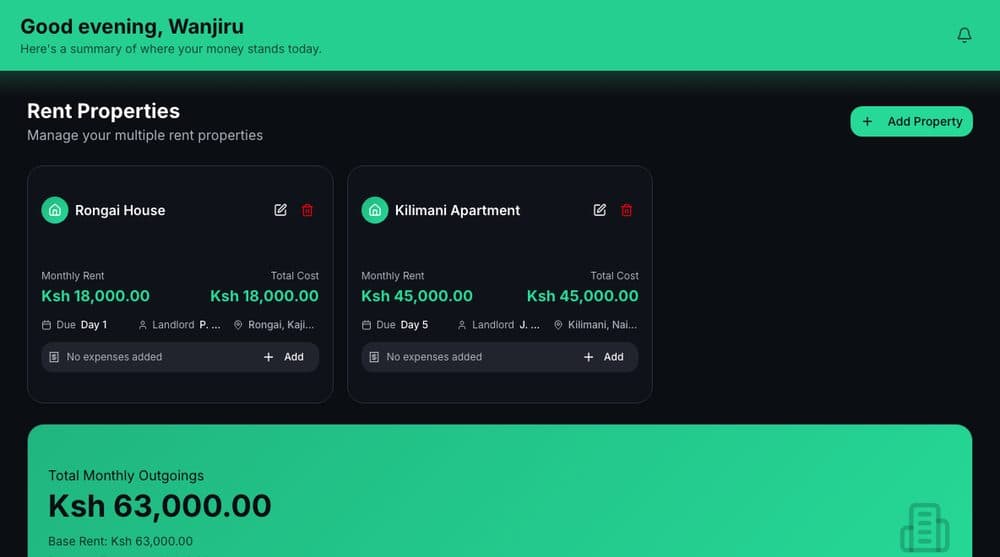
What you get
- Add as many properties as you pay rent on, each with its own landlord name, contact, and address
- Set a due day per property and get a running view of what is due next
- Log payments against a property and see total monthly outgoings roll up automatically
- Attach property-specific expenses so a property's full cost is in one place
Why it matters
If you rent a home and also pay rent on a shop, or you're covering a parent's place alongside your own, BudgetFlow keeps each property separate instead of forcing everything into one generic "rent" line. Payment history shows what's paid, what's pending, and what's overdue across every property at a glance.
Free to start, no card required
Every feature on BudgetFlow, including this one, is free to use from the day you sign up.